Dialogue Subsystems
The Dialogue System leans on Unreal's own Subsystem framework instead of manager singletons you set up yourself. This page explains the three Subsystem classes that ship with the plugin, what each one actually owns, and - critically - which ones you should reach for and which one you should ignore. This is a C++/architecture topic: you don't subclass a Subsystem to use the Dialogue System day to day, but understanding what lives here makes debugging "why won't my dialogue start" or "why isn't my widget showing" much faster.
1. Introduction
What You'll Learn
- What
UMounteaDialogueWorldSubsystemowns, and why a game project almost never calls it directly. - What
UMounteaDialogueViewportHUDSubsystemactually does, and why it's the one real HUD subsystem you should use. - Why
UMounteaDialogueLocalPlayerSubsystemexists in the source tree but should not be used. - How to fetch a reference to any of these, from C++ or from Blueprint, if you ever need to.
Info
Unreal Subsystems are created and destroyed automatically by the engine - one UMounteaDialogueWorldSubsystem per UWorld, one UMounteaDialogueViewportHUDSubsystem per local player. You never spawn or configure these yourself; they simply exist for the lifetime of their owning World or Local Player.
2. World Subsystem - the Traffic Cop for Starting Dialogues
UMounteaDialogueWorldSubsystem is a UWorldSubsystem - one instance per UWorld. It is the central registry and gatekeeper for every dialogue running in that world:
RegisteredManagers- everyUMounteaDialogueManagercurrently in the world registers itself here inBeginPlayand unregisters inEndPlay.ActiveSessions- theUMounteaDialogueSessioncomponent(s) currently running a dialogue.- A global single-dialogue lock -
TryAcquireDialogueLock/ReleaseDialogueLockenforce that only one non-monologue dialogue can run at a time across the whole world. Monologue has its own, separate lock, scoped per local player - see Monologue.
HandleStartRequest is the function that actually starts a dialogue: it acquires the lock, resolves and validates all participants, finds the graph's start node, builds the initial FMounteaDialogueContextPayload, and writes it to the UMounteaDialogueSession component on AGameState (which then replicates to every client's Manager).
Warning
You will almost never call any of this yourself. UMounteaDialogueManager registers and unregisters with this Subsystem automatically, and every server-authoritative request a Manager makes (start dialogue, select node, skip row, close dialogue) is routed through this Subsystem behind the scenes. There is no supported workflow where a project calls HandleStartRequest directly.
2.1 When You'd Actually Reach for It
Realistically, there are two reasons to touch this Subsystem directly:
- Inspecting global state -
GetRegisteredManagers()andGetActiveSessions()give you a read-only view of everything active in the world, useful for debug tooling or analytics. - Debugging "another dialogue is already active" -
HandleStartRequestrefuses to start a second dialogue while the lock is held and broadcasts[HandleStartRequest] Another dialogue is already active. Only one active dialogue is supported.on the failed Manager'sOnDialogueFailedevent. If you're chasing that message, the Subsystem's lock state (held by whichever Manager calledHandleStartRequestfirst and not yet released) is where to look.
| Function | What It Does |
|---|---|
GetRegisteredManagers() |
Read-only list of every Manager registered in this world. C++ only. |
GetActiveSessions() |
Read-only list of active UMounteaDialogueSession components. C++ only. |
GetGameStateSession() |
Finds the UMounteaDialogueSession component on the current AGameState. Returns null if the project hasn't added one - a common setup mistake. |
RegisterManager / UnregisterManager |
BlueprintCallable, but called automatically by UMounteaDialogueManager::BeginPlay / EndPlay. Only relevant if you're building a fully custom Manager replacement. |
Another Dialogue Already Active
This error means the world's single-dialogue lock is still held by a previous session - usually because a dialogue closed uncleanly, or two Managers tried to start a dialogue in the same frame. The lock releases automatically on a Manager's EndPlay, on dialogue close, and on every failure path inside HandleStartRequest itself, so a stuck lock almost always points at a Manager that never reached a proper close.
#include "Subsystem/MounteaDialogueWorldSubsystem.h"

UMounteaDialogueWorldSubsystem* Subsystem = GetWorld()->GetSubsystem<UMounteaDialogueWorldSubsystem>();
Tip
From Blueprint, the equivalent is the engine's built-in Get World Subsystem node, with Class set to Mountea Dialogue World Subsystem. You'd only need this for the same debugging/inspection use cases above - not for everyday dialogue setup.
3. Viewport HUD Subsystem - the Live HUD Subsystem
UMounteaDialogueViewportHUDSubsystem is a ULocalPlayerSubsystem - one instance per local player - implementing IMounteaDialogueHUDClassInterface. This is the Subsystem that actually puts dialogue widgets on screen:
GetViewportBaseClassresolves the viewport wrapper widget class fromUMounteaDialogueSystemSettings→UMounteaDialogueConfiguration::DefaultDialogueWrapperWidgetClass.InitializeViewportWidgetcreates that widget (viaCreateWidget) and adds it to the player's screen the first time it's needed.GetViewportWidgetreturns the currently-owned viewport widget instance.AddChildWidgetToViewport/RemoveChildWidgetFromViewportattach or detach a child widget - the actual Dialogue widget - to that viewport wrapper, or fall back toAddToPlayerScreen/RemoveFromParentdirectly if the wrapper doesn't implementIMounteaDialogueViewportWidgetInterface.
3.1 Who Calls It
You don't normally call this Subsystem's functions one by one - two other pieces of the system do it for you:
MounteaDialogueHUDStatics::GetViewportHUDSubsystemand its sibling HUD helper functions resolve this Subsystem from a Context object (actor, component, or widget) and forward to it.MounteaDialogueParticipantUserInterfaceComponent- the per-client UI component that owns what's actually on screen - callsGetSubsystem<UMounteaDialogueViewportHUDSubsystem>()directly to add and remove the reconciled dialogue widget.
#include "Subsystem/MounteaDialogueViewportHUDSubsystem.h"

if (ULocalPlayer* LocalPlayer = PlayerController->GetLocalPlayer())
{
    UMounteaDialogueViewportHUDSubsystem* HUDSubsystem =
        LocalPlayer->GetSubsystem<UMounteaDialogueViewportHUDSubsystem>();
}
Tip
From Blueprint, use the built-in Get Local Player Subsystem node with Class set to Mountea Dialogue Viewport HUD Subsystem - or the convenience Get Mountea Dialogue Viewport HUD Subsystem node from the HUD function library, which resolves the right player controller from almost any Context object automatically.
Info
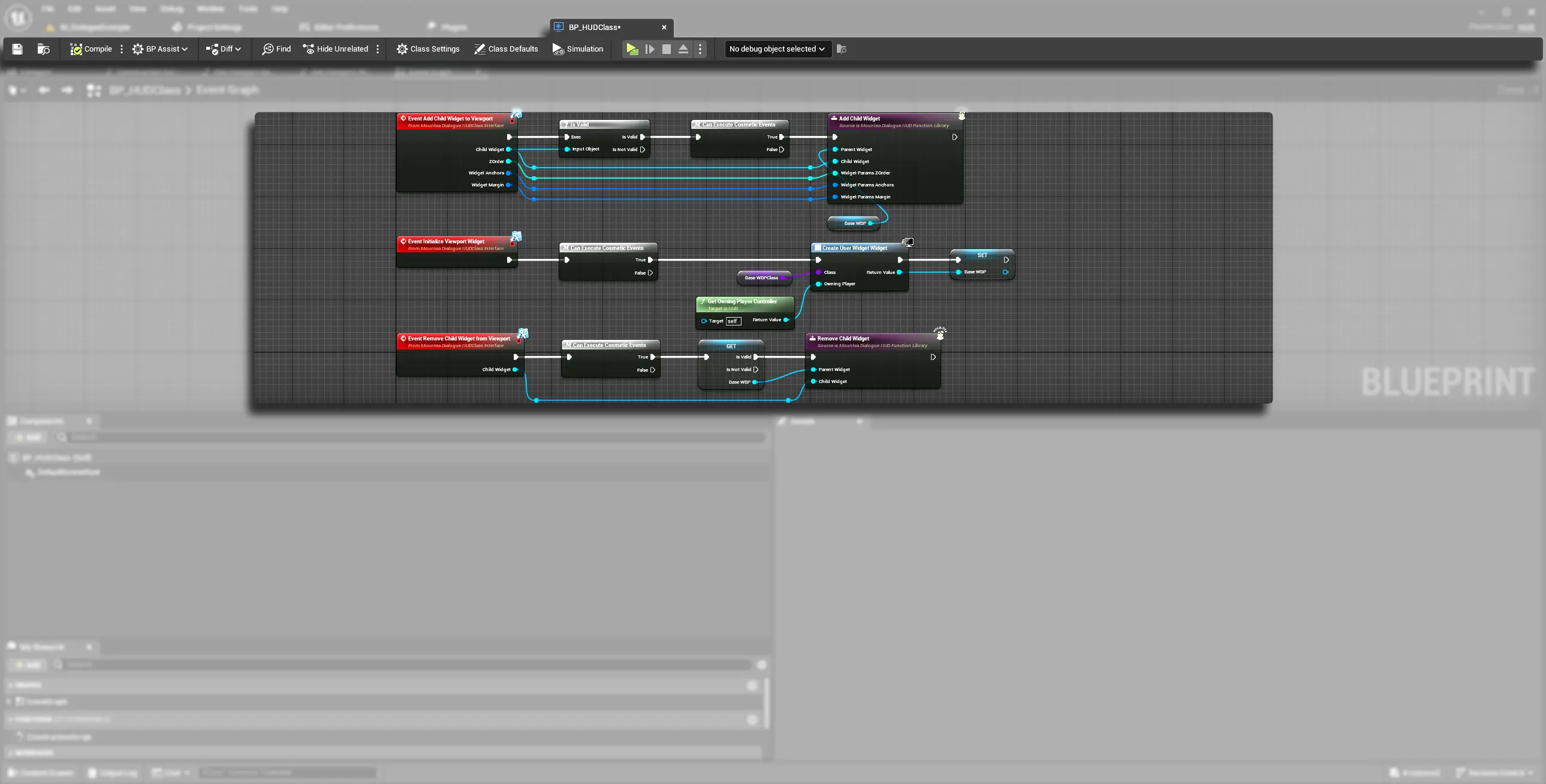
The interface this Subsystem implements, IMounteaDialogueHUDClassInterface, isn't hard-locked to the Subsystem - anything implementing it works, because MounteaDialogueHUDStatics checks Implements<UMounteaDialogueHUDClassInterface>() on whatever object it's given before falling back to this Subsystem. The screenshot below shows an example project implementing the same interface functions (Add Child Widget to Viewport, Initialize Viewport Widget, Remove Child Widget from Viewport) directly on a custom HUD Blueprint instead of relying on the Subsystem. That's a valid pattern if you need custom per-project HUD logic, but the Subsystem is the supported default and needs no setup at all.
4. Local Player Subsystem - Not Currently Used
UMounteaDialogueLocalPlayerSubsystem also exists in the source tree, structurally almost identical to UMounteaDialogueViewportHUDSubsystem - same base class (ULocalPlayerSubsystem), same IMounteaDialogueHUDClassInterface, same ViewportWidget field, plus an extra overridable ViewportBaseClass the other one lacks.
Do Not Use This Class
UMounteaDialogueLocalPlayerSubsystem is referenced nowhere else in the plugin - no statics library, no UI component, nothing calls GetSubsystem<UMounteaDialogueLocalPlayerSubsystem>() anywhere. It is dead code, almost certainly an earlier or abandoned generalization that UMounteaDialogueViewportHUDSubsystem replaced. The plugin's own config even carries a class redirect from this class's old name to UMounteaDialogueViewportHUDSubsystem, confirming the migration.
Do not build against this class. For anything HUD- or viewport-widget-related, use UMounteaDialogueViewportHUDSubsystem (see section 3 above) instead.